
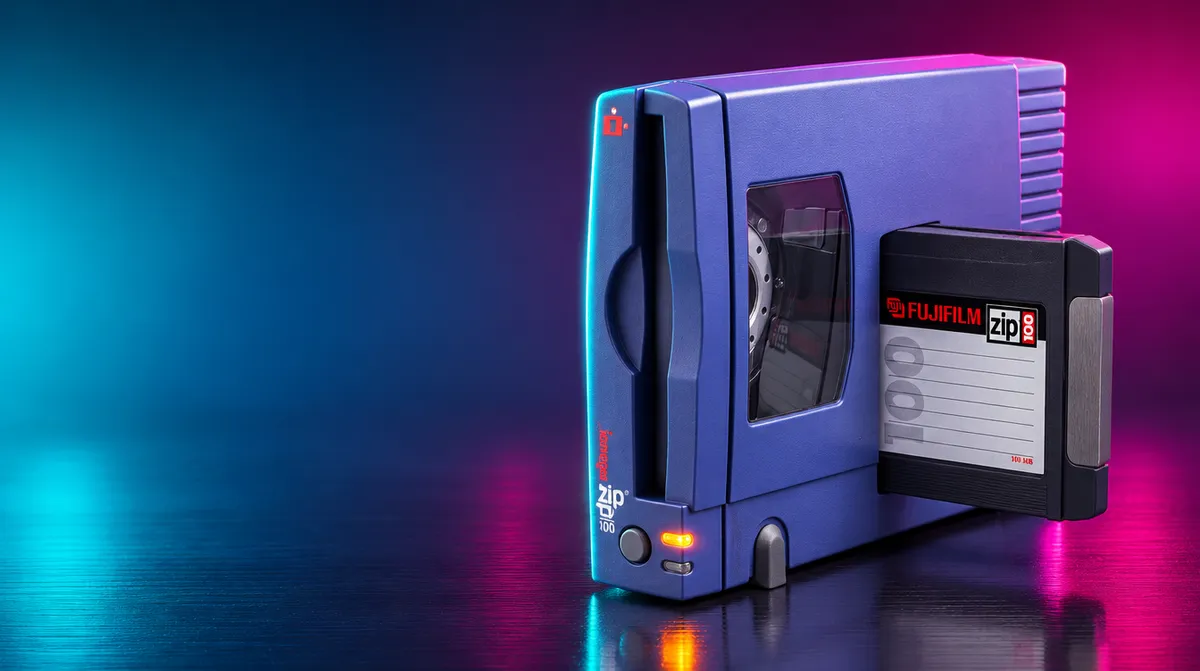
A Zip drive stored 100 MB on a flexible magnetic disk in a pocket-sized cartridge by borrowing three hard-disk ideas: heads that ride on an air bearing instead of resting on the disk, a linear voice-coil actuator instead of a stepper motor, and a disk spinning almost ten times faster than a floppy's.
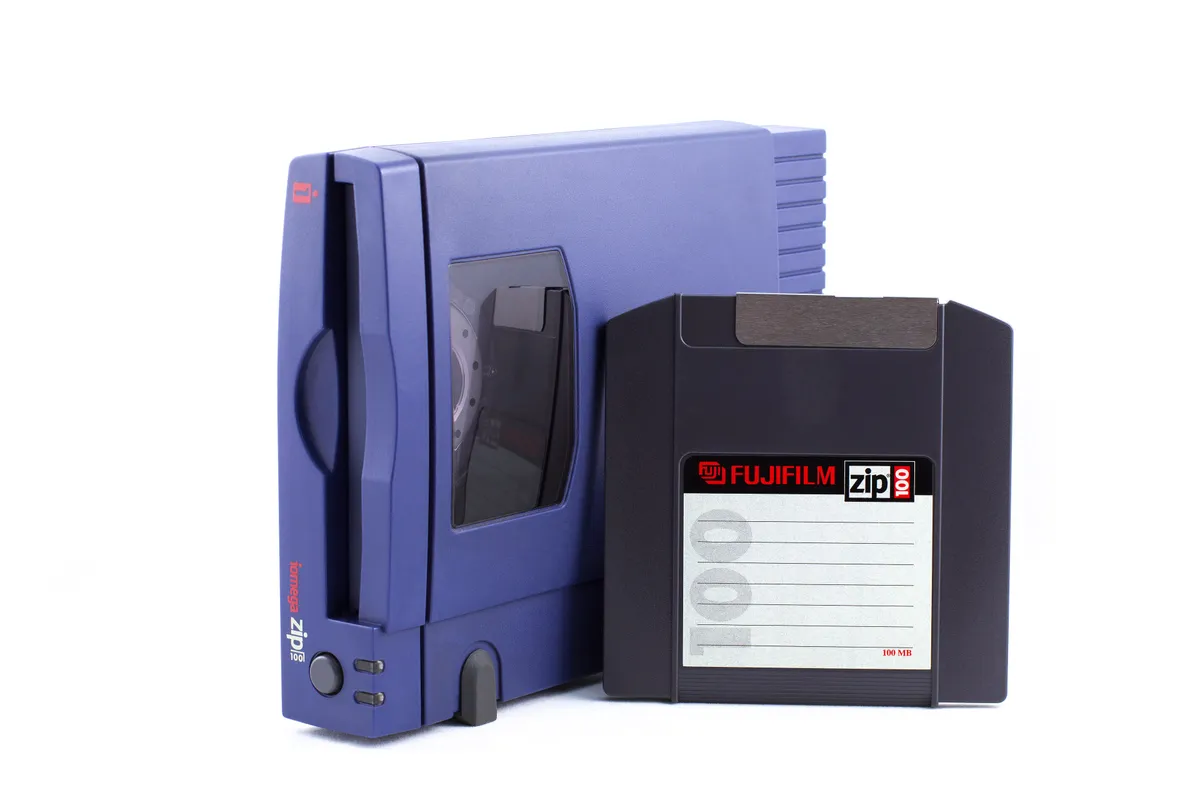
The big picture
A floppy-sized disk with hard-disk parts inside
Iomega began shipping the Zip drive in March 1995. One cartridge held 100 MB, where a floppy disk held 1.47 MB, so a single Zip disk did the work of about 68 floppies. The drive sold for about 199 US dollars and the disks for about 20 dollars each.
From the outside the disk looks like a fat floppy, and the medium inside is the same kind of thing: a thin, flexible plastic disk with a magnetic coating. The difference is in the drive. Iomega's own description of it, in its 1995 annual report, is "Winchester-style" heads with an air-bearing surface and a linear voice-coil motor, which is hard-disk language. A floppy drive has neither.
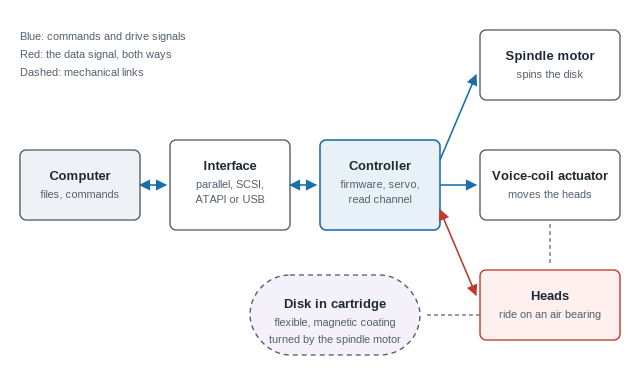
Read the diagram from left to right. The computer sends commands and data through one interface. The controller turns those into three jobs: spin the disk at a steady speed, move the heads to the right track, and turn the stream of bytes into a magnetic pattern on the way in and back into bytes on the way out. Everything that made the Zip better than a floppy sits in the right-hand column.
Inside the machine
The disk: magnetised patches in rings
The data lives in the coating. A write head is a small electromagnet: current through its winding magnetises a tiny patch of the coating one way or the other as it passes underneath, and the patch keeps that direction after the current has gone. The patches lie in concentric rings called tracks. Reading runs the other way, with the head sensing the pattern as the disk turns past it.
Two things decide how much fits on a disk of a given size: how small each patch can be, and how close the tracks can sit. Both depend on how near the head is to the coating and how precisely it can be placed. That is where the Zip's two hard-disk parts come in.
Heads on an air bearing
In a floppy drive the head is loaded onto the disk whenever a disk is in the drive, and the disk turns at 300 rpm. The Zip's heads have an air-bearing surface: as the disk spins, moving air holds the head a tiny distance above the coating. Iomega called them Winchester-style heads, which is the hard-disk term for exactly this arrangement.
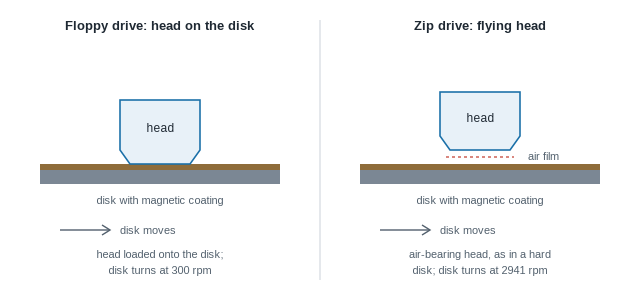
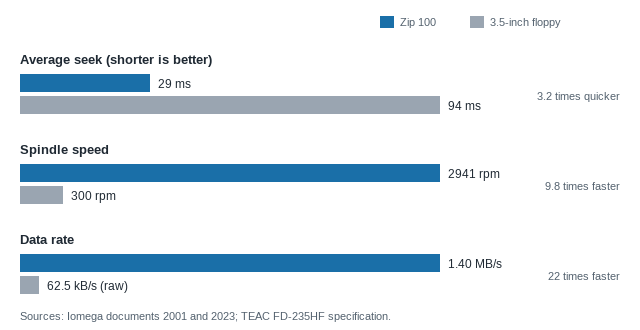
A head that rides on air lets the disk turn much faster. The Zip 100 spins at 2941 rpm, about 9.8 times a floppy's speed. More coating passes under the head each second, which is most of the reason the data rate is so much higher, and the wait for the right sector to come round is shorter: one revolution takes 20.4 ms on the Zip against 200 ms on a floppy.
The voice-coil actuator
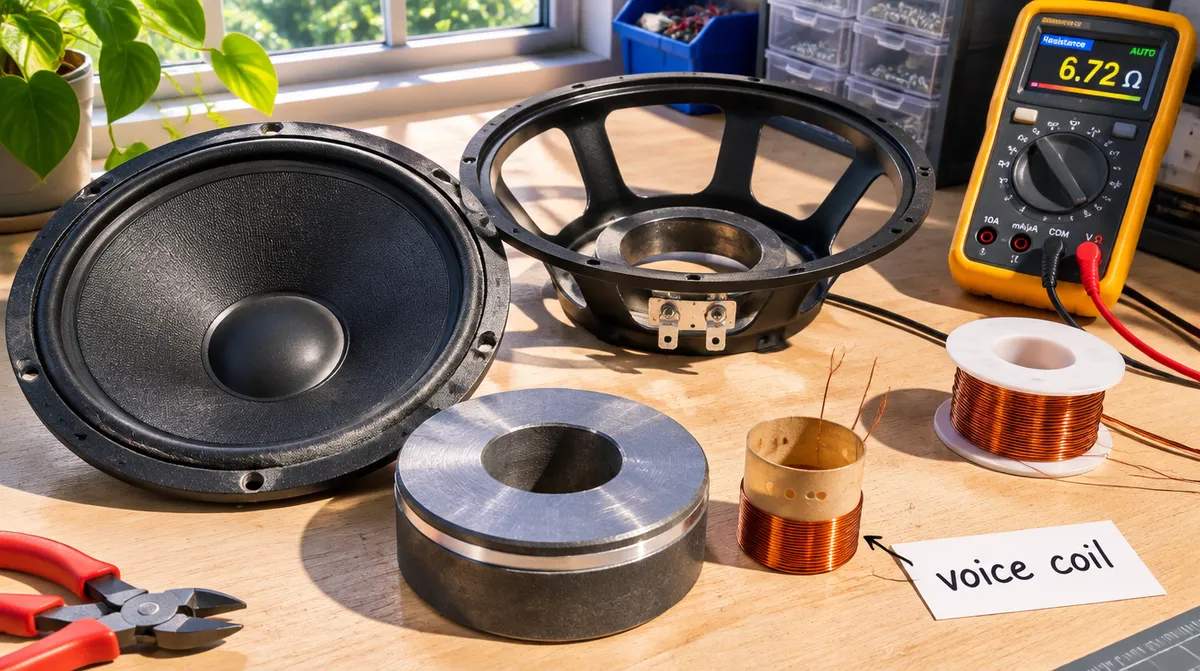
The heads also have to get to the right track. A 3.5-inch floppy drive uses a stepping motor and a lead screw, so the head moves in fixed steps, one track at a time. The Zip uses a linear voice-coil motor, the same kind of mechanism that moves the cone of a loudspeaker.
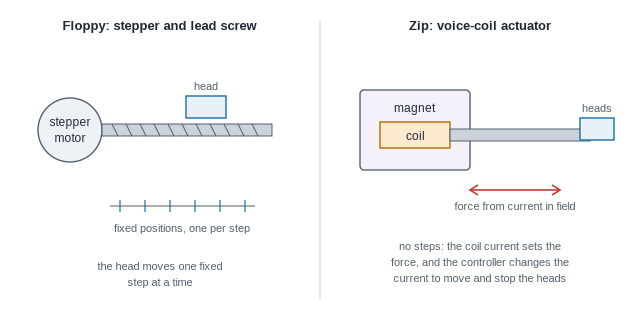
A voice coil is a coil of wire sitting in the field of a permanent magnet. A current in the coil feels a force, and the size and direction of that force follow the current. Drive more current and the arm accelerates harder; reverse it and the arm brakes or moves back. There are no fixed positions, so the controller can stop the heads wherever the track is. The result is an average seek time of 29 ms, against an average track seek of 94 ms for a typical floppy drive, which makes the Zip about 3.2 times quicker at finding data.
Plugging it in
The first Zip drives came in two external versions: one for SCSI and one for the parallel printer port. The parallel model had two 25-pin connectors, so the printer could plug into the back of the drive and keep working. Iomega added an internal ATAPI version in 1997, and later models connected over USB and FireWire.
The interface set the real speed. Iomega quoted the parallel model at up to 20 MB a minute in one document and up to 25 MB a minute in another, which is 0.33 MB/s to 0.42 MB/s, well below what the drive itself could do over SCSI.
Numbers and failures
The numbers side by side
Iomega's specification sheet for the Zip 100 gives a maximum sustained transfer rate of 1.40 MB/s. A 3.5-inch floppy drive moves raw data at 500 kilobits a second, which is 62.5 kB/s, and real file copies are slower still because of formatting and gaps between sectors.
Worked example — Filling one Zip disk
At 1.40 MB/s, writing 100 MB takes 71 s.
At the floppy drive's raw 62.5 kB/s, the same 100 MB would take 1600 s, a rate 22 times lower.
Seventy-one seconds is the best case, at the drive's maximum rate over a fast interface. Iomega's 1995 annual report gave an average sustained rate of 1.00 MB per second for the SCSI model, and the parallel-port figures above are lower again. The comparison still holds: a Zip disk was a practical way to carry a full project, where the floppy equivalent was a stack of 68 disks to swap in and out.
Bigger disks, and which disk fits which drive
Iomega announced a 250 MB Zip in November 1998 and shipped it the following month. A 750 MB model followed in August 2002, with a USB 2.0 version rated at 7.5 MB per second and a spindle speed of 3676 rpm. The rule was that a drive handles disks of its own size and smaller, with limits.
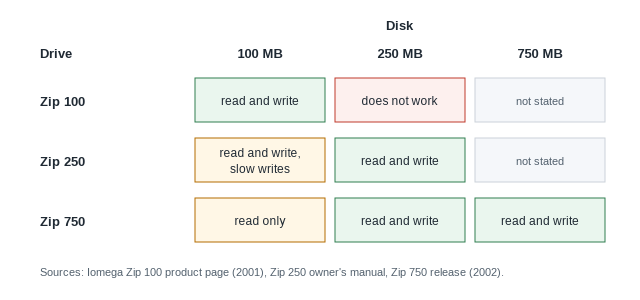
Iomega's Zip 250 manual warns that writing to a 100 MB disk is "significantly reduced" in speed, with a save that takes ten seconds on a 250 MB disk taking about a minute and a half. The Zip 750 reads and writes 250 MB disks but can only read 100 MB ones. A 250 MB disk does not work in a Zip 100 drive at all.
Real-world failure modes: the click of death
The Zip's best-known failure is the click of death: some drives began to click in a steady rhythm and stopped reading disks.
Iomega's support note on clicking separates the two cases. A single click when a disk goes in or comes out, or when a file is saved or opened, is normal. Repetitive clicking is a symptom of a damaged drive or a damaged disk.
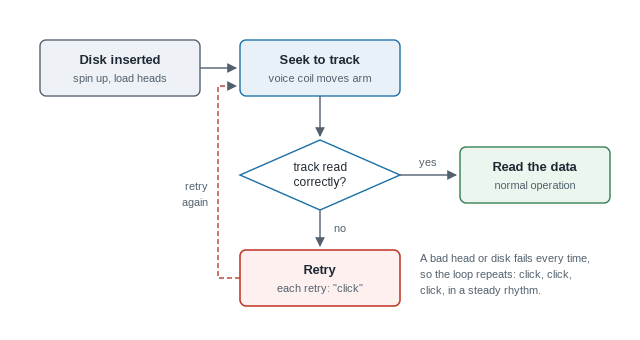
The independent technical account by Steve Gibson traces the problem to drives that were no longer writing correctly to their disks, because their heads were dirty, had been dropped or had worn out. A disk written by such a drive could then fail in a healthy drive too, which would click through its normal retry routine trying to read it. So a disk from a clicking drive could make a second drive click as well. Iomega's own figure, as reported by PC World in 1999, was that the problem affected fewer than half of one percent of users.
The voice coil can only put the head where the controller tells it to, and the controller only knows the head is in the right place if the head reads back what it expects. A head that writes or reads badly breaks that loop, and the drive's only response is to try again.
What this rests on
- Magnetic fields: the coating stores each bit as the direction of a small magnetised patch.
- Electromagnets and the solenoid: a write head is a tiny electromagnet whose current sets the direction of each patch.
- Electromagnetic induction: a changing magnetic pattern passing a coil induces a voltage, which is how inductive read heads sense recorded data.
- Motors and generators: the force on a current-carrying conductor in a field is what drives both the spindle motor and the voice coil.
- Buzzers and speakers: a loudspeaker's voice coil is the same mechanism as the Zip's head actuator.
- Stepper motors and servos: the floppy drive's stepper is the open-ended alternative the Zip replaced.
- Analogue and digital: the patches carry ones and zeros, and the read channel turns an analogue head signal back into bits.
Going further
What happened to it
Iomega announced in June 2003 that it had shipped more than 50 million Zip drives and over 315 million Zip disks. In April 2008 EMC agreed to buy Iomega for about 213 million US dollars, and in 2013 Iomega's business became part of LenovoEMC, a joint venture with Lenovo.
Common mistakes
- Treating every click as the click of death. One click when a disk goes in, comes out or is accessed is normal, by Iomega's own note. Only a steady, repeating click is the symptom.
- Testing a suspect disk in a second drive, then a third. A disk damaged by a failing drive can make a healthy drive retry and click too, so moving it from drive to drive does not tell you which part is bad.
- Expecting a Zip 750 to write old 100 MB disks. It reads them only. A Zip 250 writes them, but much more slowly than its own disks.
- Quoting the drive's maximum rate as copy speed. The maximum sustained figure is for a fast interface; the parallel-port model was a fraction of it.
Frequently asked questions
How much did a Zip disk hold compared with a floppy?
A Zip 100 disk held 100 MB, counted as 100 million bytes, against 1.47 million bytes on a 1.44 MB floppy, so one Zip disk replaced about 68 floppies. Later disks held 250 MB and 750 MB.
Why was the Zip drive so much faster than a floppy drive?
Its heads rode on an air bearing like a hard disk's, so the disk could spin at 2941 rpm instead of 300 rpm, and a voice-coil actuator moved the heads faster than a floppy's stepper motor. Iomega rated it at 1.40 MB per second maximum and 29 ms average seek.
What was the Zip click of death?
A failure in which a drive clicked repeatedly and could not read disks. Iomega's support note says repetitive clicking means a damaged drive or disk, while a single click on insert, eject or access is normal.
Can a Zip 250 drive read 100 MB disks?
Yes. It reads and writes them, though Iomega's manual says writing to a 100 MB disk is significantly slower. A Zip 750 drive can read 100 MB disks but not write to them.
Did Zip drives work with any computer?
Most of the time. Iomega made parallel-port and SCSI versions from the start, an internal ATAPI version from 1997, and later USB and FireWire models. The parallel version had a pass-through socket for the printer.
Is a Zip disk the same as a floppy disk?
The medium is similar, a flexible magnetic disk in a cartridge, but the drive is not. A Zip drive uses hard-disk style heads on an air bearing and a voice-coil actuator, where a floppy drive uses a head loaded onto the disk and a stepper motor.
Knowledge check
A Zip disk holds 100 MB and a floppy holds 1.47 MB. About how many floppies does one Zip disk replace? (Show answer)
At its maximum of 1.40 MB/s, how long does a Zip 100 take to write a full 100 MB disk? (Show answer)
Why can a voice-coil actuator stop a head anywhere, when a stepper motor cannot? (Show answer)
A drive clicks once each time you put a disk in. Is that the click of death? (Show answer)
Can a Zip 750 drive save a file to a 100 MB Zip disk? (Show answer)
References
- Iomega Corporation, Form 10-K for fiscal 1995, SEC EDGAR, Item 1 (Business), Zip section and products table: shipping from March 1995; "Winchester-style nanoslide heads with a special airbearing surface combined with a linear voice coil motor"; 29 ms average seek; 1.00 MB/s average sustained rate (SCSI); parallel and SCSI versions; drive and disk prices.
- Iomega, Document 2001, Zip 100 specification sheet (archived 1996): 1.40 MB/s maximum sustained transfer rate; 29 ms average seek; parallel model up to 25 MB a minute; two 25-pin connectors with printer pass-through. This sheet gives the rotational speed as 2945 rpm.
- Iomega, Document 2023, Zip 100 ATAPI specifications (archived 1998): rotational speed 2941 rpm; 1.40 MB/s maximum.
- Iomega, Document 2056, Zip drive performance (archived 1996): parallel-port model up to 20 MB a minute.
- Iomega, Document 2135, "My Zip drive is clicking" (archived 1998): a single click on insert, eject or access is normal; repetitive clicking is a symptom of a damaged drive or disk.
- Iomega, Zip 100 drive user's guide: capacity stated with 1 MB = 1 million bytes.
- Iomega, press release, Zip 250 announcement, 16 November 1998: 250 MB drives also read and write 100 MB disks; and Zip 250 ATAPI owner's manual: writing to a 100 MB disk is significantly slower, about a minute and a half for a ten-second save.
- Iomega, product page, Zip 100 parallel drive (archived 2001): 250 MB disks do not work in 100 MB drives.
- Iomega, press release, Zip 750 shipping, 15 August 2002: reads and writes 250 MB disks, reads 100 MB disks only; and Document 11428, Zip 750 specifications, 22 August 2002: 7.5 MB/s on USB 2.0, 3676 rpm, 29.0 ms average seek.
- Iomega, press release on the ATAPI Zip drive, 14 March 1997; Document 11441, Zip 750 FireWire specifications, 20 November 2002; Iomega Form 10-K for fiscal 2003, Item 1: ATAPI, USB and FireWire models.
- Iomega, press release, fifty millionth Zip drive, 17 June 2003: unveiled at Comdex in November 1994; more than 50 million drives and over 315 million disks shipped.
- TidBITS, "Zip-ity Doo-Dah: the Iomega Zip drive", 10 April 1995: drive 199 US dollars mail order, disks about 20 dollars each.
- TEAC, FD-235HF micro floppy disk drive specification, Rev. A: tables 4.1-1 (500 kbit/s transfer rate), 4.3-1 (300 rpm spindle, 100 ms average latency), 4.6 (head loaded whenever a disk is installed) and 4.7-1 (stepping motor and lead screw; 94 ms average track seek including settling).
- Steve Gibson, Gibson Research Corporation, "Click of death" FAQ, part 4 and "Anatomy of the Zip drive", 1998: drives that no longer write correctly, retries in a second drive, voice-coil head actuator.
- PC World, "The click of death ate my data", 15 January 1999: Iomega's figure of fewer than half of one percent affected.
- EMC Corporation and Iomega, "EMC to acquire Iomega", 8 April 2008, SEC exhibit 99.1: about 213 million US dollars.
- Lenovo, press release on the LenovoEMC joint venture, 3 January 2013: incorporating the core assets of EMC's Iomega business.
- Photo of the Zip 100 drive and disk: "Iomega Zip 100 drive with a disk" by Yuri Litvinenko / 30pin, Wikimedia Commons, licensed CC BY 2.0; resized. The other two photos on this page are illustrations.

Sources checked
One email a month from the bench
New circuits, lessons, part guides and calculators, on the first Sunday of each month.